Version 1.40.3 · Free · Final beta
Plan the sub array.
Then rig it
once.
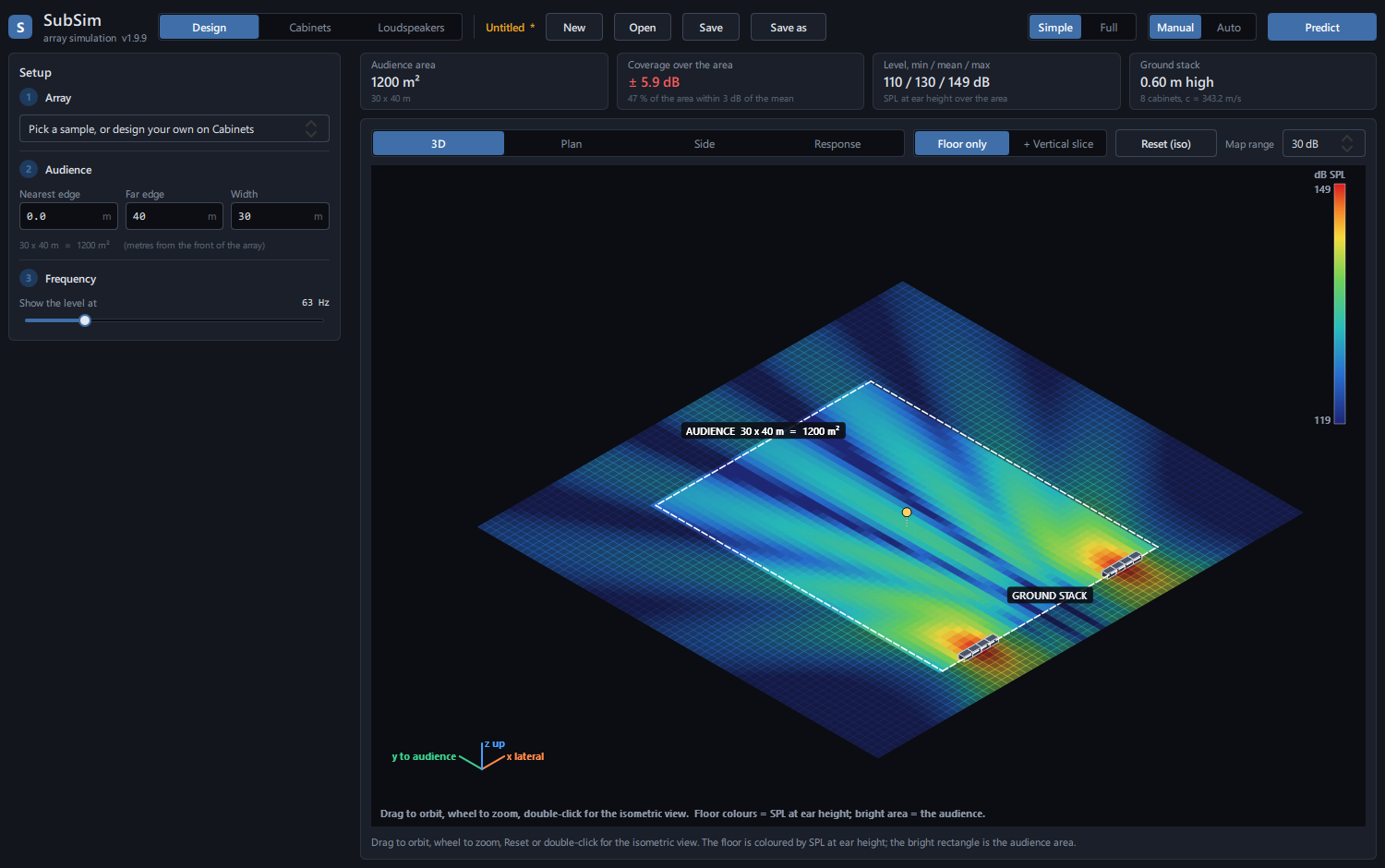
SubSim predicts how a subwoofer array covers an audience — flown or ground-stacked, in a line, end-fire or cardioid, in open air or a room with walls. Type the venue, pick a setup, press Predict, and see where it is loud, where it thins out, and why.
Windows 10 or 11 · no licence · no account · works offline · public beta
What it does
The questions you ask at load-in, answered before you get there.
Describe the audience area, choose a cabinet and a formation, and SubSim adds the sound from every box — with its delay, polarity and directivity — so cancellation and coverage show up the way they do on site.
- 1Describe the venue
Audience width and distances, ear height, temperature, floor type. Optionally a room with walls.
- 2Choose the array
Start from a sample, or pick a cabinet, flown or ground, formation and quantities.
- 3Predict
One button. Maps, coverage spread and level numbers update from the same calculation.
- 4Adjust and save
Change any cabinet's level, delay or polarity, then save the session as a file.
Functions
Real screens from the program.
Every picture below is a screenshot of SubSim 1.9.9. Nothing here is a mock-up.
Sample configurations
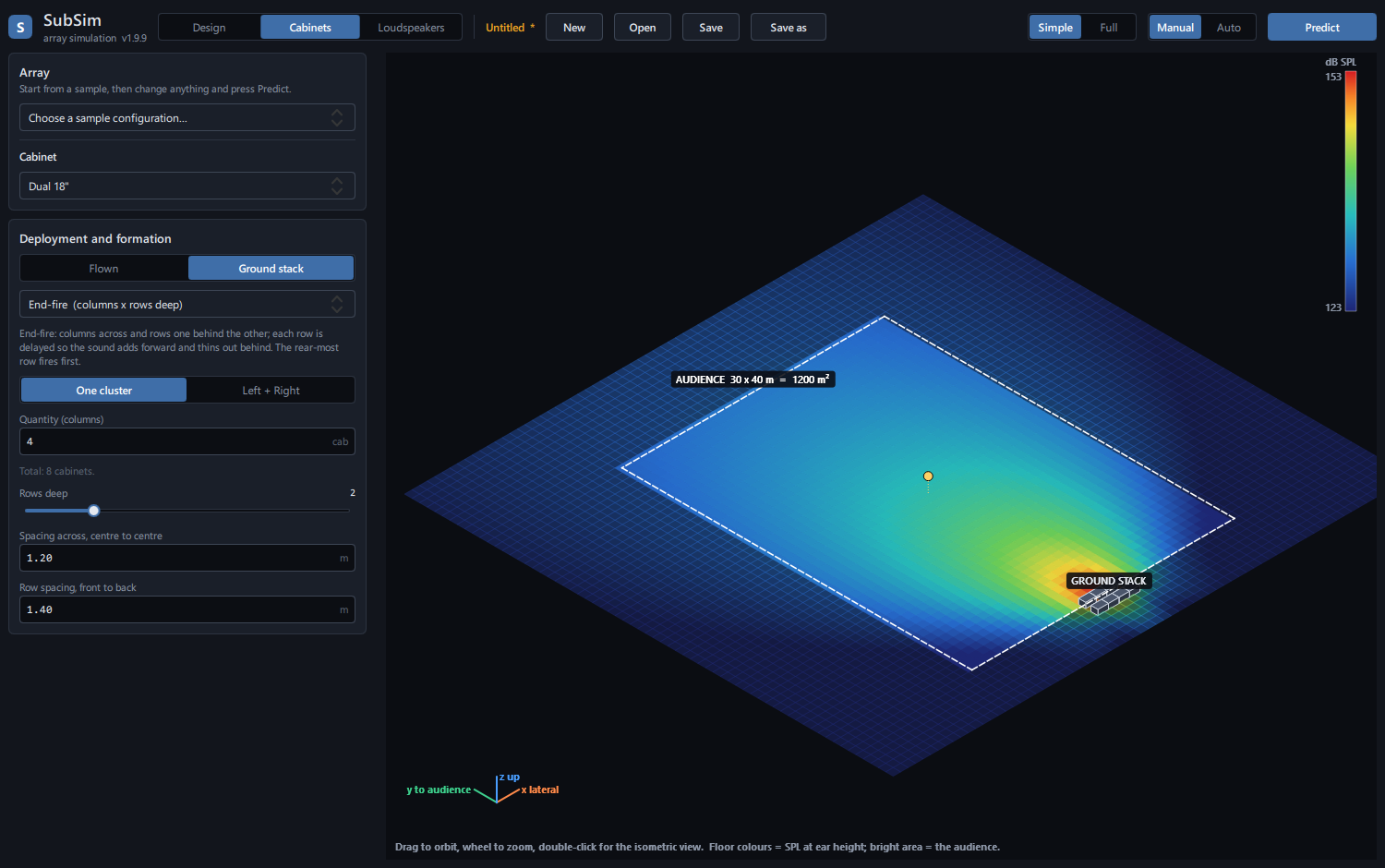
Nine ready-made setups in a drop-down — lines, cardioid stacks, end-fire arrays, left and right clusters. One click loads and predicts. Everything stays editable.
- Dual 18 inch front-loaded boxes to start
- Change quantity, spacing, delay or polarity afterwards
- Flown or ground stack, columns and rows
- Simple view for a first run, Full view for every control
Plan view — drag the array
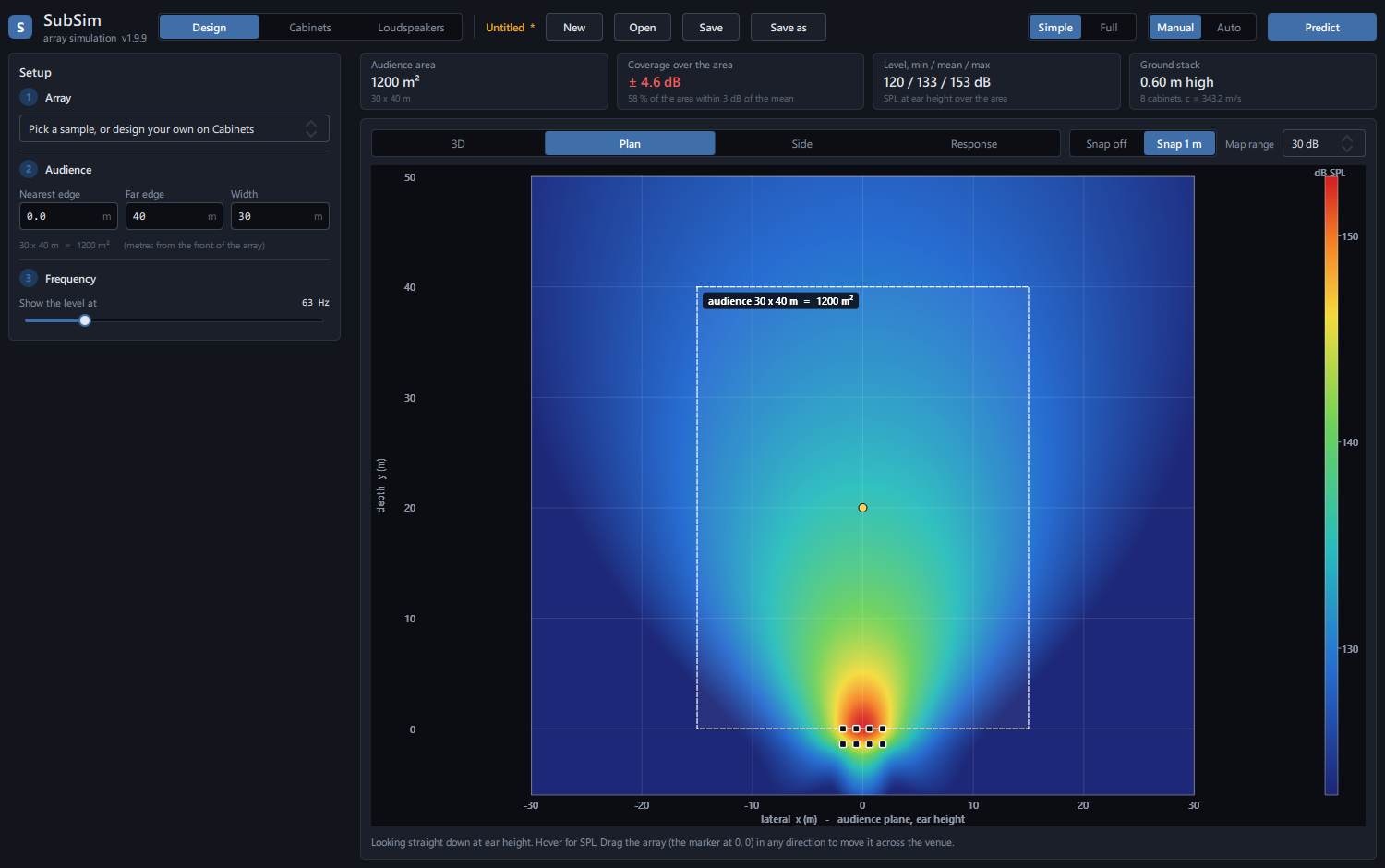
Top-down at ear height, with the audience outlined. Hover for the level at any point. Drag the array anywhere across the venue, with or without snap to 1 m.
- End-fire: rear row delayed so rows add forward and cancel behind
- Put the array inside the audience area if that's the job
Side view — whole slice or just the audience
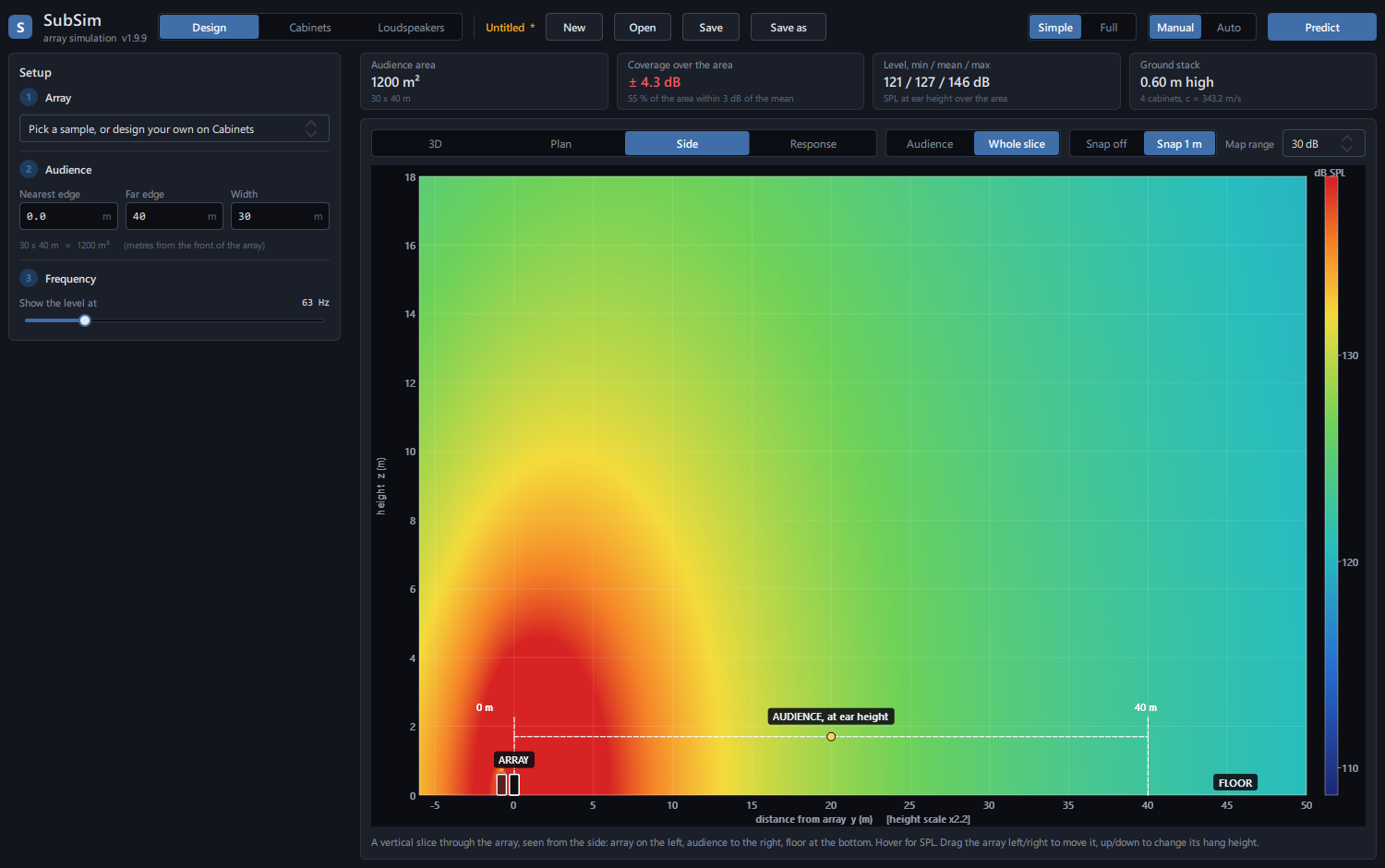
The side view shows the full vertical slice through the array. Switch it to Audience and it colours only the strip at ear height and leaves the rest dark, so you read what people hear, not the loud air above the stack.
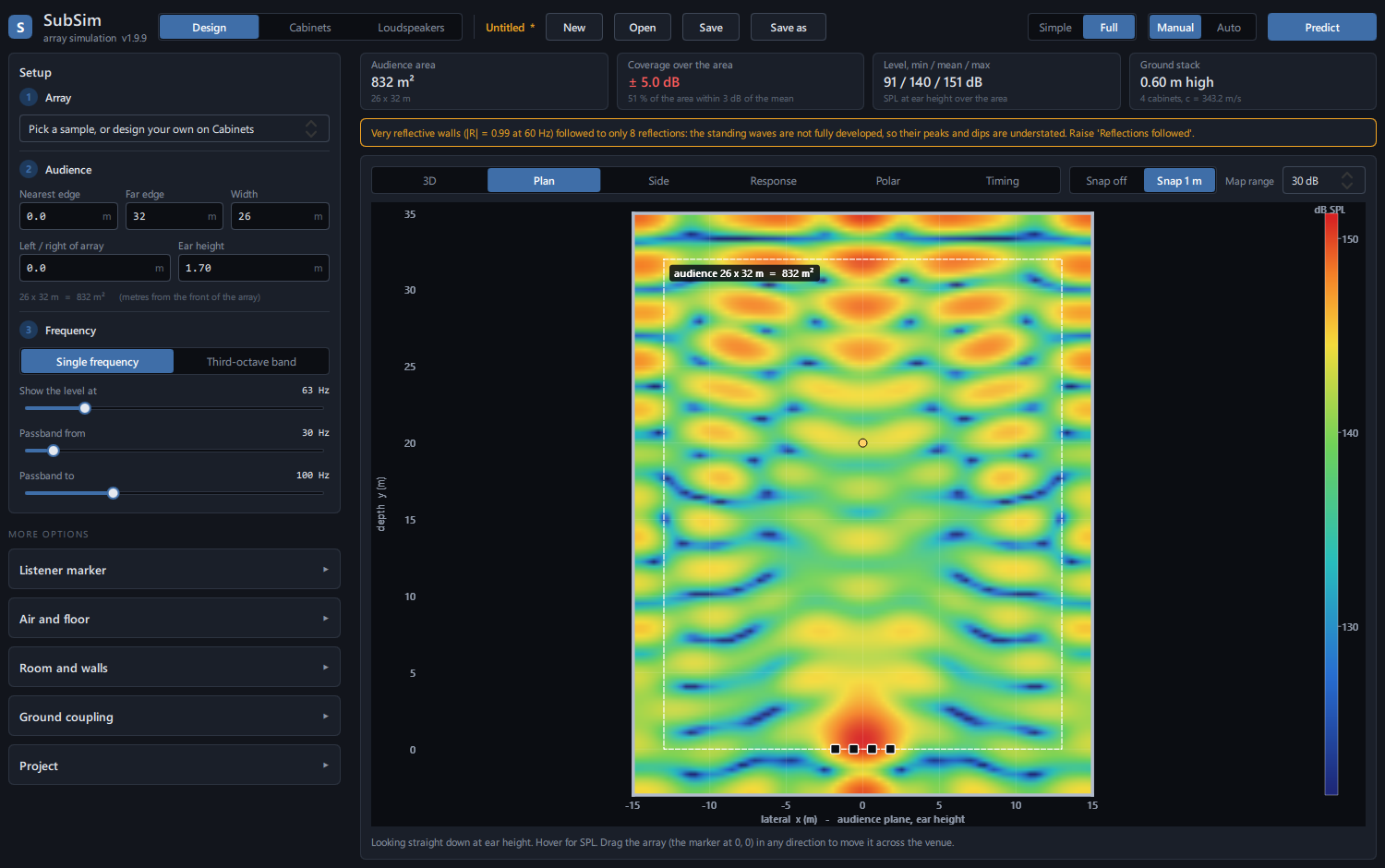
Room and walls — reflections and standing waves
Turn on walls with a material and thickness on each side. Standing waves need two facing walls: with walls on both sides of the audience, or in front of and behind the subs, the sound rings at low frequencies and the bands you see here are those standing waves. A single wall gives reflections but no ringing, and with no walls at all there are none.
- One line per wall: distance, thickness, material
- Room size in X, Y and Z
- Open at the front: no wall there, so no ringing along the depth
- A reflecting wall inside the audience: set its distance there
Time alignment
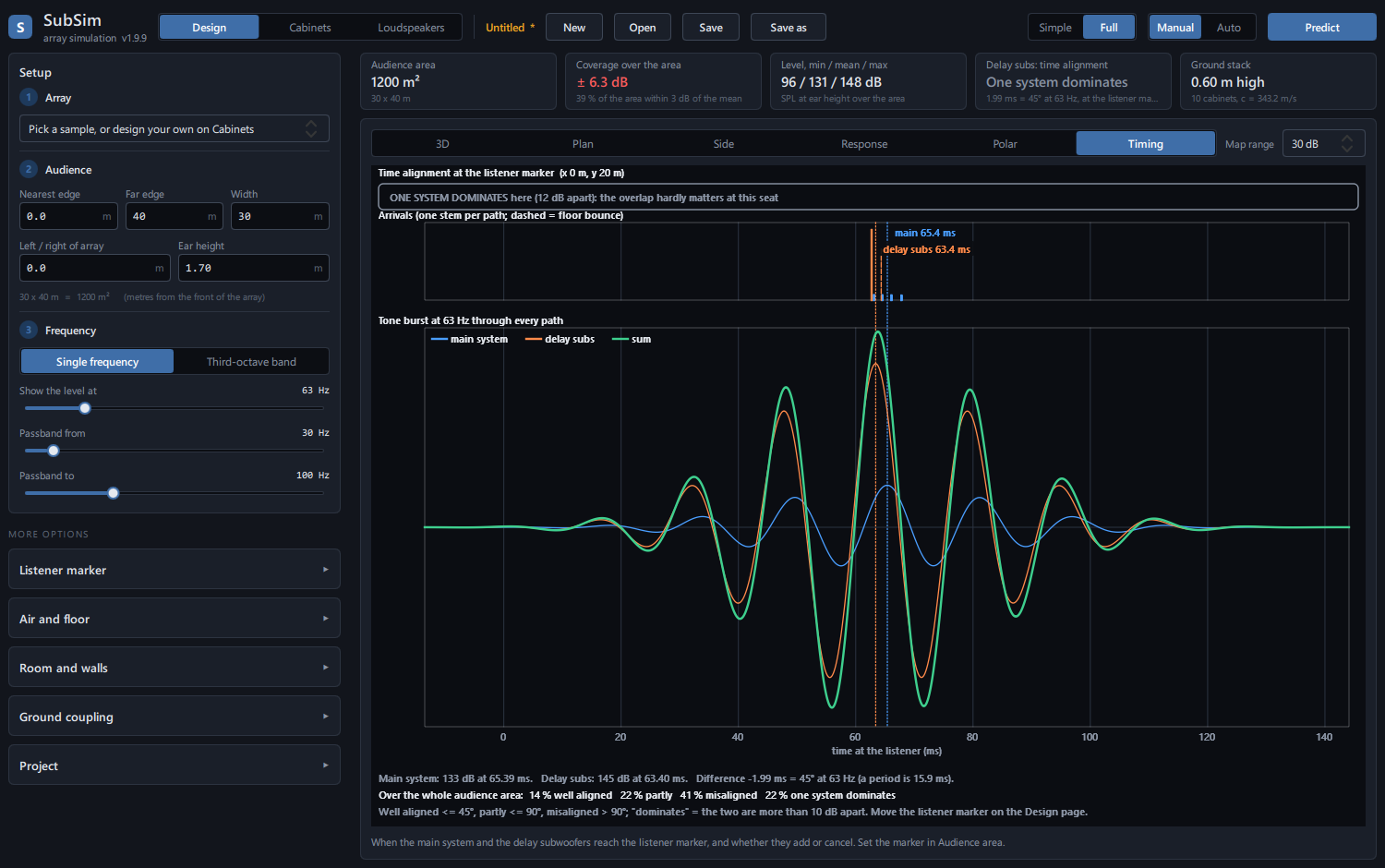
Add delay subwoofers partway down the venue, type the distance, and SubSim derives the delay. Then see when each system arrives at a listener, the phase between them, and whether they add or cancel.
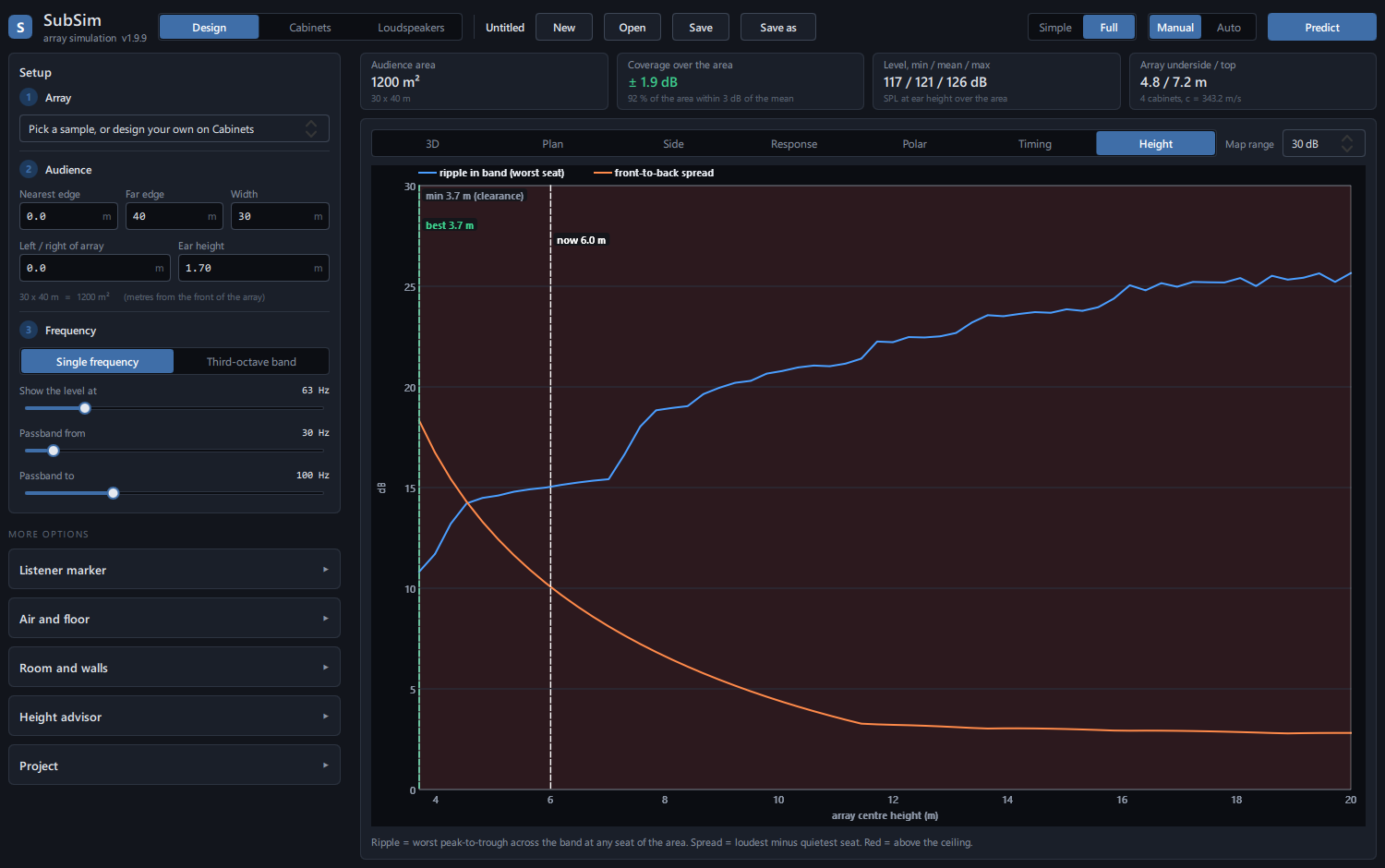
Height advisor for flown arrays
The floor bounce makes a null. Raise the array too far and that null lands inside your passband. The advisor sweeps the hang height and shows the ripple and the front-to-back spread, with the best height marked.
Real subwoofers
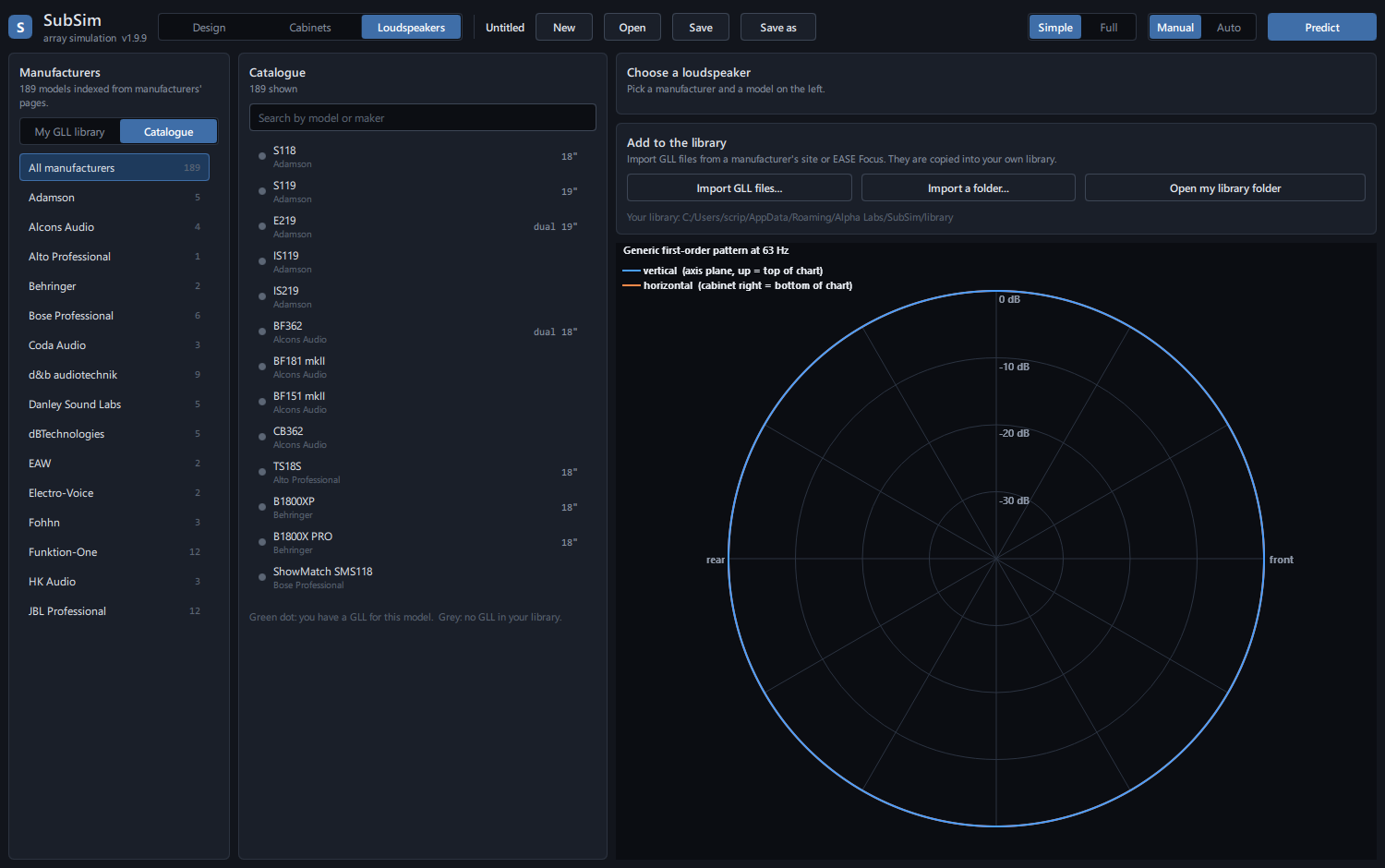
Browse 32 real subwoofers by maker — Martin Audio, L-Acoustics, d&b, Danley, Funktion-One, NEXO, Meyer Sound and more — with every figure the maker publishes and a link to the source. One click uses a box for the whole array. Each box has a 3D directivity balloon you can orbit (the typical pattern for its design; load measured balloon data to replace it), a drawing to scale, and how it compares with the rest.
Sample configurations
Start from a setup that already works.
Choose one on the Cabinets page. It loads the boxes and predicts at once: dual 18 inch front-loaded boxes on the ground, except the flown ones (samples 11 and 12 use single 18 inch boxes).
| # | Sample | What you get |
|---|---|---|
| 1 | Center line, 4 boxes | One line side by side, all in phase |
| 2 | Center line, 8 boxes | One line of 8 |
| 3 | Left + right line, 4 each | A line each side, 20 m apart |
| 4 | Center stacked cardioid, 3 stacks of 3 | The usual live cardioid: the middle box of each stack turned round, inverted and delayed |
| 5 | Center stacked cardioid, 4 stacks of 2 | The lower box of each stack reversed |
| 6 | Left + right stacked cardioid, 2 stacks of 3 each | A cardioid stack pair each side, 20 m apart |
| 7 | Center end-fire, 4 columns × 2 rows | Rear row delayed: adds forward, thins out behind |
| 8 | Center end-fire, 8 columns × 2 rows | 16 cabinets |
| 9 | Left + right end-fire cardioid pairs | Front row plus an inverted, delayed rear row on each side |
| 10 | Flown stacked cardioid, 2 groups of 3 | Hung as one column at 7 m: see it on the Side view and the 3D vertical slice |
| 11 | Left + right flown supercardioid, 2 groups of 3 single 18" each side | The middle box of each group turned round, tuned supercardioid and balanced, lowest box 6 m up: the quietest back half, and the floor bounce on the Side view |
| 12 | Left + right flown end-fire, 2 columns of 6 single 18" each side | 24 boxes, the front column waiting for the rear one, lowest box 6 m up |
| 13 | Left + right: flown cardioid of 6 over a ground line of 4, each side | 20 boxes, no delay between flown and ground: where they cancel (high up near the rigs) and where they add |
The physics
Plain about how it works.
Built on classical acoustics — coherent point sources, mirror-image reflections, ISO 9613-1 — with features in line with published AES work on subwoofer arrays (Corteel, Welti, Hill), and checked by automated tests against known results.
Every cabinet is a point source. SubSim adds their sound as complex pressure — magnitude and phase — at every point, which is why the cancellations you meet in real arrays show up.
Coherent sum
Each cabinet's pressure, with delay, polarity and directivity, is added as a phasor. Levels across a band are then summed by power.
Floor and walls
The floor and each wall become mirror-image sources, and a wall's reflection depends on its material and thickness. Parallel walls ring at n × c / 2L.
Air and temperature
Speed of sound from temperature, and air absorption to ISO 9613-1 with humidity. Temperature changes distances, never delays.
Checked against known results
Automated tests compare the engine with hand-worked results: inverse-square law, coherent doubling, the array-factor formula, the floor-null frequency, and Allison’s boundary notch (a sub near a wall loses output near c / 4d).
ISO 9613-2 readout
The standard's ground effect is shown beside the floor-bounce result at the listener marker. It is a level correction with no phase, so the maps use the floor-bounce model.
Ground presets
Concrete, wooden deck, packed earth, grass and snow set the floor reflection, each labelled with its ISO 9613-2 ground class.
Further reading
Published work that SubSim’s features line up with. SubSim was not built from these papers, and its results have not yet been compared with theirs — they are where to read more.
| In SubSim | Reading |
|---|---|
| Flown vs ground, height advice, A / B compare | Corteel, Coste Dombre, Combet, Horyn, Montignies, “On the Efficiency of Flown vs. Ground Stacked Subwoofer Configurations”, AES 145th Convention, 2018, paper 10051 |
| Seat-to-seat spread | Welti, “How Many Subwoofers are Enough?”, AES 112th Convention, 2002, paper 5602; Welti, “Optimal Configurations for Subwoofers in Rooms Considering Seat to Seat Variation and Low Frequency Efficiency”, AES 133rd Convention, 2012, paper 8748 |
| Sub positioning and set-up | Hill, Hawksford, Rosenthal, Gand, “Subwoofer Positioning, Orientation, and Calibration for Large-Scale Sound Reinforcement”, AES 128th Convention, 2010, paper 7971 |
| End-fire formations | Verbinnen, “Constant Directivity End-fire Arrays for Public Address Systems”, AES 120th Convention, 2006, paper 6785; Boone, Cho, Ih, “Development of a Highly Directive Endfire Loudspeaker Array”, AES 122nd Convention, 2007 |
| Cardioid subs in rooms | Ferekidis, Kempe, “The Beneficial Coupling of Cardioid Low Frequency Sources to the Acoustics of Small Rooms”, AES 116th Convention, 2004, paper 6110 |
| Comparing with a measurement | Shabalina, Kaiser, Ramuscak, Vorländer, “Live Measurements of Subwoofers’ Performance”, JAES 61(3), 2013 |
| Walls and floor as mirror images | Allen, Berkley, “Image method for efficiently simulating small-room acoustics”, JASA 65, 1979 |
| Air absorption, ground effect | ISO 9613-1 and ISO 9613-2 |
Download
Free. No licence, no key, no timer.
Install it, use it, share it with your crew.
Free beta
SubSim 1.40.3 for Windows
No cost, ever asked
Installs for your user — no administrator needed. Works offline. Sessions are files you choose.
Download SubSim-Setup-1.40.3.exeSubSim is in beta: it is used and tested, and it still changes often — see What’s new. If something looks wrong, email us what you did. Windows 10 or 11, 64-bit. Windows may show a SmartScreen notice because the installer is not code-signed yet: choose “More info”, then “Run anyway”.
What you get
- Flown and ground-stack arrays
- Line, end-fire, cardioid and stacked cardioid
- Left and right clusters, delay subs
- Rooms with walls, standing waves
- Time alignment and height advisor
- 32 real subwoofers from the makers’ figures
- Place, add and remove single boxes
- Box arrival times and one-click line-up
- Compare with Sonasync, REW or Smaart measurements
- A / B compare of two designs
- Undo and redo
- Save and open sessions
What’s new
Every version, what changed.
SubSim is in beta and moves quickly. Here is what each release added and fixed, newest first.
1.40.3 Yamaha CXS15XLF added Added
- The Yamaha CXS15XLF joins the real boxes (32 now), with Yamaha’s published figures: 450 × 587 × 600 mm, bass-reflex, 98 dB sensitivity, 400 W continuous (800 W program), 8 Ω, 130 dB max SPL.
1.40.2 Yamaha CXS18XLF: the maker's figures Fixed
- The Yamaha CXS18XLF now carries Yamaha's own published figures, read from its owner's manual: size 550 × 657 × 720 mm, bass-reflex, 100 dB sensitivity, 500 W continuous (1000 W program), 8 Ω, 133 dB max SPL. Before, it had no size or sensitivity, and listed the program power as its continuous rating.
1.40.1 Units on the box card Fixed
- A box's position on its settings card now says metres, and that Z is the height of the box's centre (a 0.75 m box on the floor shows 0.38).
1.40.0 Rooms, by the book Added
- In a room the maps reach past the walls and the ceiling, dimmed: the sound as the walls send it back (not the level outside).
- The ceiling shows in 3D when you orbit to the side, and fades away from above.
- Point at a wall, the floor or the ceiling to see what it is: far wall · Glass 0.01 m.
- The room physics checked against the book: a second, independent implementation of the image-source method (Allen & Berkley) agrees to 0.001 dB, and in a closed room the peaks fall on the textbook room modes. The manual now lists every material value and what the room model leaves out.
- "Level" on a box is now called Gain, with the SPL at 1 m it gives.
1.39.0 Final beta Checked
- The final beta: every page and view checked for errors in simple and full views, editing sequences (turn, copy, paste, undo, redo, save and reopen) checked step by step, 60 predictions in a row with no memory growing, and the layout checked on a 1280 × 720 screen.
1.38.1 Checked twice Fixed
- Every level SubSim shows was checked against a second, independent implementation of the formulas in the manual: they agree to 0.01 dB. Air absorption matches the published ISO 9613-2 table.
- "Faces front / back" now turns a box round even after you have turned it with its laser.
- A drag interrupted by another window no longer leaves a box drawn where it was not.
1.38.0 A calmer header Changed
- The top bar is down to what you use: a File menu (New, Open, Save, Save as), undo and redo arrows, Full view and Auto predict as one-button switches, Predict, and ? for the manual.
1.37.0 The user manual Added
- Press F1 anywhere: the manual opens at the part you are working on. Every control, view and formation is explained, with every formula SubSim uses, exactly as the program computes it, and what the model leaves out.
- The same manual is on this site, and it opens as a web page for printing.
1.36.0 Copy and paste boxes Added
- Select a box (or a group) and press Ctrl+C, then Ctrl+V: the copies land on the first free spot beside them, with the same level, delay, polarity and aim, ready to drag. Ctrl+D duplicates in one go; the same buttons are in the box's settings.
1.35.0 A smooth 3D view Changed
- The 3D floor and vertical slice are drawn as smooth as the Plan and Side views, with faint 5 m lines on the floor.
1.34.0 Turn a box by its laser Added
- Grab a box's laser on the Plan or 3D view and drag: the box turns to point at the mouse, all the way round, in whole degrees with Snap on. A finer angle can be typed in its settings.
- The 3D floor no longer jumps while you orbit or pan.
1.33.0 A calmer layout Changed
- The Cabinets page is three steps: the box, the formation, where it hangs. One picker for every box, generic or real.
- Click a box and its settings open right on the plot: position, level, delay, facing and polarity.
- + Flown box and + Ground box sit above the plot, and each view keeps its own settings in one View menu. Explanations are one hover away.
1.32.0 Move boxes in 3D Added
- In the 3D view (Design and Cabinets pages) click a box to select it, Ctrl+click to add another, and drag to move it over the floor. A flown box keeps its height. Drag anywhere else to pan, as before.
1.31.0 Flown and ground together Added
- Sample 13: on each side a flown cardioid of 6 over a ground line of 4, no delay between them, as rigged before anyone aligns them. Slice through one rig on the Side view to see where they cancel: high up near the rigs, where tiers and balconies sit, by up to 14 dB at 80–100 Hz. The floor audience mostly gains.
1.30.0 Supercardioid Added
- A stacked cardioid can now be tuned cardioid, supercardioid or hypercardioid (how long the reversed box waits), and balanced (the forward boxes turned down so the reversed one can match them).
- Sample 11 is now a flown supercardioid, the arena choice: the quietest back half overall.
- The Front-to-back card shows both figures: straight behind, and the back half on average.
1.29.0 The floor bounce explained; flown cardioid and end-fire samples Added
- Point at the Side view and it tells you what the floor reflection does there: how many dB it adds or takes away, how much farther the bounce travels, and how late it arrives.
- Laser, Floor reflection and Snap are now single buttons: blue when on, grey when off. Floor reflection off = open space.
- Sample 11 is now a real flown cardioid: 2 groups of 3 single 18 inch boxes a side, the middle box of each turned round and delayed. New sample 12: a flown end-fire, 2 columns of 6 a side (24 boxes). End-fire positions can now be columns (Boxes high).
- The person on the Loudspeakers page looks like a person.
1.28.0 A new sample: flown left + right cardioid columns Added
- Sample 11: left + right flown columns, 6 single 18 inch cardioid boxes each side, 20 m apart, the lowest box 6 m above the floor. Open the Side view to see what the floor bounce does to a flown sub.
1.27.1 Under the floor: the whole wave; steadier orbiting Fixed
- Under a reflecting floor the side view now shows the sound carrying on as if the floor were not there: the whole wave the floor catches and sends back up. Above the floor nothing changes: direct sound plus the bounce.
- Orbiting the 3D view with the mouse off the plot no longer swings the plot up and away: it spins in place.
1.27.0 The side view reaches below the floor Added
- The side view no longer ends at the floor: it reaches 5 m below it, so the whole pattern of a ground stack shows. The floor is a line at 0 m, the audience line stays at ear height, and heights still count from the floor.
- With the floor reflecting, the part below it is drawn dimmed: it is the picture of the bounce, not sound underground. The floor bounce is still in every level above the floor.
- Choose none, 2, 5 or 10 m below the floor in the side view's options.
1.26.1 A crash in the room model fixed; quieter lasers Fixed
- With the room switched on and many boxes, SubSim could close unexpectedly now and then. Fixed; the cause is tested directly.
- The lasers are now a thin white line with a slim arrowhead, visible on every level colour without covering the map.
- Orbiting now turns the way you drag, in the 3D view and on the Loudspeakers balloon.
- The To scale drawing shows a person 1.8 m tall beside the box, so the size reads at a glance.
1.26.0 Lasers: where every box points Added
- A red laser from every box shows the way it faces, out to the far edge of the audience, on the 3D, Plan and Side views. A box turned round (the middle one of a stacked cardioid) shows a short arrow backwards. One switch turns them off.
1.25.0 3D directivity balloon Added
- Each real subwoofer now shows a 3D directivity balloon you can orbit, pan and zoom like the 3D view: a cardioid box like the NEXO CD18 shows its quiet back at a glance.
- The box drawn to scale next to a 1.8 m person, and how its max SPL, low end and weight compare with the other boxes.
1.24.0 Browse the real subwoofers Added
- The Loudspeakers page now shows the real subwoofers by maker, with every published figure, its source, search and filters, and one click to use a box for the whole array.
- The pattern chart shows the typical shape of each box’s design (horn, cardioid, front-loaded).
- The old GLL list, which could only show a file’s name, is gone.
1.23.4 3D: orbit around a speaker, smoothly AddedFixed
- Start a right-drag on a speaker and the view turns around that speaker; anywhere else, around the spot under the mouse.
- Slower and smooth: the view glides to where the mouse says, and draws lighter while it moves.
- The turning point could drift by a few millimetres during an orbit; it now stays exactly under the mouse.
1.23.3 3D: orbit around the mouse, slowly Added
- Right-drag in 3D now turns the view around the spot under the mouse, and more slowly, for precise angles.
1.23.2 4-Acoustic PCS-218HB Fixed
- The 4-Acoustic box is now the PCS-218HB, with the figures from 4-Acoustic’s own page (1200 × 600 × 800 mm, 104 dB, 3000 W AES, 144 dB). It replaces a “PCS-218BS” that only a dealer listed.
1.23.1 Real-box figures cross-checked Fixed
- The real-box figures were checked a second time against the makers’ own pages. Corrected: the L-Acoustics KS28 size (the maker does not say which side is the height, so SubSim no longer assumes), the Renkus-Heinz DR18-2 (self-powered: 135 dB peak), and the DAS ACTION-S218A now comes from DAS’s own page.
1.23.0 31 real subwoofers to design with Added
- Load a real box: Martin Audio WSX and SX218, L-Acoustics KS28, d&b B2-SUB, Danley TH118 / TH118XL / TH121 / DBH218, Funktion-One F118 / F218 / F121 / F221 / F124, NEXO STM S118 / RS18 / CD18, Meyer Sound 2100-LFC / 1800-LFC, JBL SRX828SP, EAW Otto, TW AUDiO BSX, Yamaha, DAS, FBT, dBTechnologies, Renkus-Heinz, Audiocenter, Beta Three, 4-Acoustic PCS-218HB.
- One click fills in its size, design, sensitivity, power and maximum SPL from the maker’s published figures, with the source shown and anything assumed said plainly.
1.22.0 Pan, orbit and zoom where the mouse is Added
- 3D: left-drag pans, right-drag orbits, the wheel zooms towards the mouse; double-click puts the view back.
- Plan and Side: the wheel zooms towards the mouse (up to 100×), drag empty map to pan, double-click for the whole map. Dragging a box still moves the box.
1.21.0 A / B compare: flown or ground? Added
- Keep as B, change the design, predict again, and the Plan view shows A, B or A − B: red where the new design is louder, blue where it is quieter.
- Both designs’ coverage, seat-to-seat spread and level side by side, and how much of the audience gets more than 3 dB louder or quieter.
1.20.0 Seat-to-seat spread across the sub band Added
- A new figure, Seat to seat: how much the level changes from seat to seat in every third-octave band of the sub range, with the worst band named. One frequency can look even while another is not.
- The coverage figure now says which frequency it is for.
1.19.0 Compare with a real measurement AddedFixed
- Import a measurement from Sonasync, REW or Smaart (text or CSV export) and see it over SubSim’s prediction at the listening position, with the difference in dB. The level is matched so the shape is compared; smoothing from 1/12 to 1/3 octave.
- Export the prediction as a text file for your measurement program.
- A warning when seats come closer to a box than the box’s own size, where treating the box as a point stops being exact.
- Reset to defaults did not fully reset since 1.15.0: it kept box edits and added boxes. It now resets everything.
- The default audience now starts 2 m from the subs, like a real front row.
1.18.0 Side view at true scale Fixed
- The side view was stretched about twice as tall as it really is, which made every sub’s upward spread look steeper than it is. It now opens at true scale — one metre up is as long as one metre across — with “Taller” one click away.
- The view options moved to their own row, so the view tabs are readable again.
1.17.0 Move the vertical slice Added
- The Side view and the 3D vertical slice can go through the centre, the left or right cluster, or the selected box — not only between the clusters.
- Moving the slice redraws it at once, without a new prediction.
1.16.0 Stacked cardioid, the usual live setup Added
- Stacked cardioid: stacks 3 high with the middle box turned round, or 2 high with the lower one — inverted and delayed by the box’s own depth, radiating from its back face.
- On the ground as stacks side by side, or flown as groups hung in one column.
- New samples: 3 stacks of 3, 4 stacks of 2, left + right, and a flown column. The older rear-row cardioid is still there.
1.15.0 Start empty, add and remove boxes AddedFixed
- New starts empty, with a standard 40 × 40 m audience.
- + Add box: a flown box or a ground box, one at a time — with or without a ready-made formation.
- − Remove takes the selected boxes out. Reset all edits puts a formation’s boxes back.
- Auto predict sometimes stopped working until Manual / Auto was switched back and forth. Every on/off switch now always shows the true setting.
- Manual / Auto stays as you set it through New, Open and Undo.
1.14.0 Undo and redo Added
- Undo and Redo buttons, Ctrl+Z and Ctrl+Y. A slider drag is one step; the last 40 steps are kept.
1.13.1 A bigger 3D view Added
- The cabinet table takes only the room its rows need; the 3D view gets the rest.
1.13.0 Arrival time of a moved box Added
- Move a box and see, live, how many milliseconds early or late it now arrives at the listening position.
- One click delays it back in line. The Timing view shows its wave against the rest of the array, wall bounces included.
1.12.0 Box personality Added
- Enter what the box is: front-loaded, horn, tapped horn, bandpass, tapered or cardioid; sensitivity, power, impedance.
- The level at 1 m can be worked out from sensitivity and power. Shows the amplifier load of boxes in parallel.
1.11.0 Select and group boxes Added
- Click a box to see its position; Ctrl+click builds a group. Type a position or drag, and every box of the group moves.
1.10.0 Place any single box Added
- Drag one box on the Plan or Side view, or type its X, Y and Z — like placing a loudspeaker in EASE Focus.
- Turn any box to face the back, or invert it, to design your own cardioid.
1.9.10 – 1.9.29 Reliability and speed Fixed
- Room predictions went from minutes to seconds, say how long they will take, and can be stopped.
- A damaged session or loudspeaker file can no longer crash the program.
- Per-box edits stay with their box when the quantity changes; the loudspeaker list no longer fills with repeats.
- The height advice, hover readout and ground setting now agree with the maps.
- Twenty-one audit findings in all, each fixed and tested.
FAQ
Quick answers.
Is it really free?
Yes. No licence, no activation, no expiry. SubSim is offered free by Master Pro Sounds and Lights Services.
Who makes it?
SubSim is owned and developed by Master Pro Sounds and Lights Services, Cebu, Philippines.
Does it need the internet?
No. It runs entirely on your computer and keeps your sessions in files you choose.
Can I use my manufacturer's data?
You can attach a cabinet's balloon data (as a CSV) to the array or to a single cabinet. Without it, SubSim uses a generic first-order pattern and tells you so.
How does it calculate?
It adds the sound from every cabinet as complex pressure, magnitude and phase, with mirror-image sources for the floor and walls, air absorption to ISO 9613-1 and the standard’s ground effect alongside. The engine is tested against known acoustics results, and its features are in line with published AES work on subwoofer arrays (see Further reading under The physics). As with any prediction software, confirm the final design on site with a measurement microphone — and SubSim can now show that measurement over its prediction.
Why “beta”?
SubSim is new and changes every few days. Every release is tested before it goes out, but it has not yet been checked against many real venues. Use it to plan, and confirm the result on site with a measurement microphone.
What about Mac or Linux?
SubSim is Windows-only for now.